Samba server installation on Raspberry PI
A question, a problem or a suggestion, don't hesitate : a little email
A web page to describe the installation of a data server (Samba) on a Raspberry PI :
- Samba server installation,
- Connection of an external disk,
- Connection from a Windows PC,
- Connection from an Android smartphone.
The server

With Bookworm, use Preferences -> Add/Remove Software then search samba. I have used SMB/CIFS file... samba-2:4.17.12...
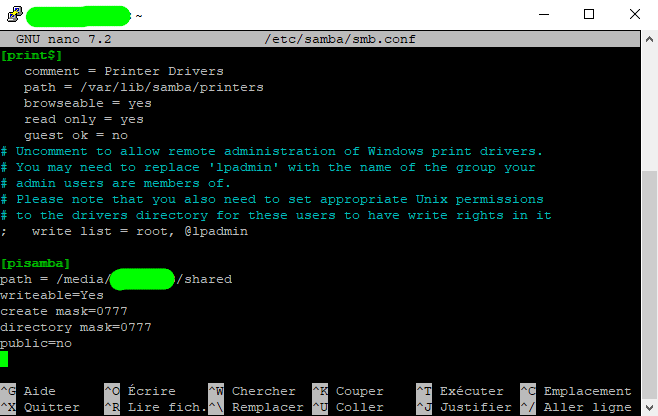
The system is setup editing the configuration file :
sudo nano /etc/samba/smb.conf
and adding at the end of the file the [pisamba] section (or the name you what to choose) as you see on the picture (with the path you want for the files).
If needed, create the directory with the mkdir /media/MyUser/shared command.
Define the samba user with : sudo smbpasswd -a MyUser and choose the password.
Relauch the system with sudo systemctl restart smbd.
Memory

To store my data, I have connected a SSD drive to the Raspberry. Once connected, you have to :
- Create the directory where the disk will be mounted with sudo mkdir /media/MyUser which seems to be done during the Bookworm installation,
- Give the rights with sudo chmod 755 /media/MyUser,
- Mount the disk (if not already done) with sudo mount /dev/sda1 /media/MyUser.
To be sure that the disk is always mounted, I have added this command in a *.sh file executed during the boot.
Connection with a Windows PC

Use the Windows file explorer, then "Connect a network disk".
Choose the disk letter (D, E,...), the directory for instance \\192.168.x.y\pisamba (192.168.x.y being the Ethernet address of the Raspberry), and tick the 2 boxes.
Enter the username and the password as defined above.
On a huge file, then throughput with a Raspberry 4 is about 60 Mo/s for upload and 85 Mo/s in download.
Connection with an Android smartphone

With my ASUS smartphone (ROG Phone), launch the file explorer and select "Network..." in the bottom left menu.
Select the Raspberry then the pisamba directory.
Enter the username and the password as defined above.